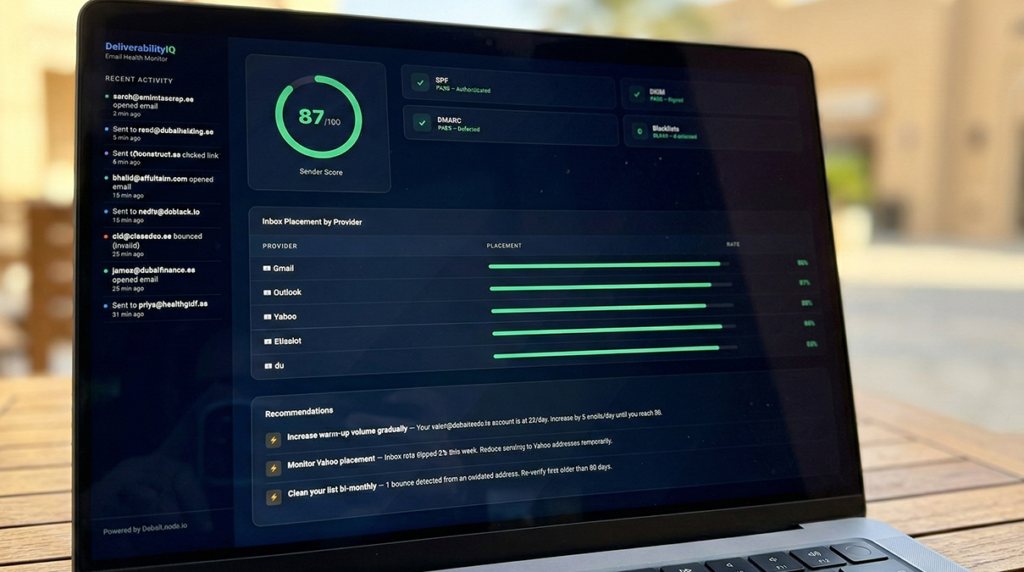
In fact, this email deliverability guide covers everything you need to land in the primary inbox — from SPF and DKIM setup to sender reputation management specific to the UAE market.
Moreover, you wrote a strong cold email. Therefore, you targeted the right companies. Next, you hit send. And your email landed in spam — or worse, never arrived at all.
Yet deliverability is the single most overlooked variable in cold email. Frankly, you can have the best copy, the best offer, and the best list in Dubai — none of it matters if your emails don’t reach the inbox. For example, a 2% improvement in inbox placement across a 1,000-email campaign can mean 20 more people actually see your message. At a 5% reply rate, that’s one more meeting. Scale that over months, and deliverability is the difference between a pipeline that grows and one that stalls.
In fact, this guide covers everything you need to know about getting your emails into the inbox — with specific considerations for sending to UAE-based businesses and working with Middle Eastern ISPs.
First, run your domain through MXToolbox to check your DNS records, blacklist status, and mail server configuration in seconds.
Email Deliverability Guide: Understanding the Basics
In simple terms, email deliverability is the percentage of your emails that reach the recipient’s inbox (not spam, not promotions, not bounced — the actual inbox). Specifically, it’s determined by a combination of technical configuration, sender behavior, list quality, and content signals.
Effectively, think of it as a credit score for your email domain. As this email deliverability guide explains, every email you send either builds or damages that score. Inbox providers like Gmail, Outlook, and Yahoo use complex algorithms to decide where your email lands, and they’re getting smarter every year.
Importantly, here are the key numbers you should know:
- Good inbox placement rate: 85-95%
- Average inbox placement rate: 70-85%
- Poor (you have a problem): Below 70%
- Acceptable bounce rate: Under 3%
- Target spam complaint rate: Under 0.1% (Google’s threshold)
Consequently, if you’re doing cold email in Dubai and your open rates are below 30%, deliverability is almost certainly part of the problem. Therefore, before you rewrite your subject lines or tweak your copy, check your technical setup first.
2. Additionally, the 3 Authentication Protocols You Must Configure (SPF, DKIM, DMARC)
In essence, email authentication tells inbox providers that you are who you say you are. Without it, your emails look suspicious — like a letter with no return address. As a result, this email deliverability guide covers three protocols you need to configure, all non-negotiable for cold email.
Email Deliverability Guide: SPF (Sender Policy Framework)
Essentially, SPF tells receiving mail servers which IP addresses and servers are authorized to send email on behalf of your domain. Without SPF, however, anyone could send email pretending to be you@yourdomain.com.
How to set it up:
- Essentially, go to your domain’s DNS management panel (GoDaddy, Namecheap, Cloudflare, etc.)
- Add a TXT record with the following format:
v=spf1 include:_spf.google.com include:sendgrid.net ~all - The
include:statements list every service authorized to send email from your domain. If you use Google Workspace AND a cold email tool like Instantly, both need to be included. - Use
~all(soft fail) rather than-all(hard fail) to avoid accidentally blocking legitimate email during setup.
Common mistakes in Dubai: Moreover, many businesses use du or Etisalat business email and forget to add their cold email tool’s SPF records. If you’re sending from Instantly, Smartlead, or Lemlist in addition to your business email, all sending sources must be in your SPF record.
Email Deliverability Guide: DKIM (DomainKeys Identified Mail)
Indeed, DKIM adds a digital signature to every email you send. As covered in this email deliverability guide, the receiving server checks this signature against a public key published in your DNS. If the signature matches, the email hasn’t been tampered with in transit.
How to set it up:
- Specifically, your email service provider (Google Workspace, Microsoft 365) will generate a DKIM key pair for you.
- In Google Workspace: Admin Console > Apps > Google Workspace > Gmail > Authenticate Email.
- Then, copy the DKIM record (a long TXT record) and add it to your DNS.
- Subsequently, activate DKIM signing in your email provider.
- Per this email deliverability guide, if you use a cold email tool, repeat this process for that tool’s DKIM requirements.
Verification: Send a test email to mail-tester.com. Notably, it will show you whether DKIM is properly configured and signing your emails.
DMARC (Domain-based Message Authentication, Reporting & Conformance)
Essentially, this protocol builds on SPF and DKIM. Essentially, it tells receiving servers what to do when an email fails SPF or DKIM checks, and it gives you reporting on authentication results.
How to set it up:
- Add a TXT record in your DNS for
_dmarc.yourdomain.com - Start with a monitoring-only policy:
v=DMARC1; p=none; rua=mailto:dmarc@yourdomain.com; pct=100 - After 2-4 weeks of monitoring reports (to make sure legitimate email isn’t failing), tighten the policy:
v=DMARC1; p=quarantine; rua=mailto:dmarc@yourdomain.com; pct=100 - Eventually move to the strictest setting:
v=DMARC1; p=reject; rua=mailto:dmarc@yourdomain.com; pct=100
Why this matters for cold email: Gmail and Yahoo both tightened their DMARC requirements in February 2024. Consequently, domains without DMARC configured face significantly higher spam filtering. If you’re sending cold email to Gmail addresses (and in Dubai’s B2B market, many decision-makers use Gmail or Google Workspace), DMARC is mandatory.
3. Sender Reputation: What It Is and How to Monitor It
Specifically, your sender reputation is a score that inbox providers assign to your domain and sending IP based on your historical sending behavior. Essentially, high reputation = inbox. Low reputation = spam folder. In particular, no reputation (new domain) = suspicion.
What builds reputation:
- Consistently low bounce rates (under 2%)
- High engagement (opens, replies, clicks)
- Zero or near-zero spam complaints
- Proper authentication (SPF, DKIM, DMARC)
- Gradual volume increases over time
- Recipients adding you to contacts or replying
What destroys reputation:
- High bounce rates (above 5%)
- Spam complaints (above 0.1%)
- Sending to spam traps (recycled email addresses used by ISPs to catch spammers)
- Sudden volume spikes (going from 10 emails/day to 500 overnight)
- Low engagement rates (emails that are never opened)
- Getting blacklisted on Spamhaus, Barracuda, or similar
If you’re starting with a new domain for cold email — which is recommended practice to protect your primary domain — you’ll need to warm it up before sending at volume. As a result, this means gradually increasing your sending volume over 2-4 weeks while maintaining high engagement. For a step-by-step warming process, see our email warmup guide.
How to check your sender reputation:
- Google Postmaster Tools: Free. Shows your domain reputation with Gmail specifically (Low / Medium / High). As a result, this is the single most important reputation metric if you’re sending to Google Workspace users in Dubai.
- Microsoft SNDS (Smart Network Data Services): Shows your reputation with Outlook/Hotmail.
- Sender Score (by Validity): A 0-100 score based on your sending IP reputation.
- Talos Intelligence (Cisco): Checks your IP and domain reputation.
4. Additionally, the 15 Factors That Determine Inbox vs. Spam
Importantly, inbox providers don’t use a single signal to filter your email. Consequently, they use a weighted combination of factors. Below are the 15 that matter most, ranked roughly by impact:
- Domain reputation: Indeed, your historical sending behavior matters most. Additionally, the single biggest factor.
- IP reputation: The reputation of the IP address you’re sending from.
- Authentication (SPF/DKIM/DMARC): Whether your emails pass all three checks.
- Bounce rate: The percentage of emails that fail to deliver.
- Spam complaint rate: How often recipients mark your email as spam.
- Engagement history: Do recipients typically open, reply to, or click your emails?
- Content quality: Spammy words, excessive links, HTML-heavy formatting, and certain phrases trigger filters.
- Sending volume patterns: Sudden spikes in volume are a red flag.
- Unsubscribe rate: High unsubscribe rates signal unwanted email.
- Spam trap hits: Sending to known spam trap addresses is a major penalty.
- List age and quality: Old, unengaged lists produce poor signals.
- Image-to-text ratio: Particularly, emails that are mostly images with little text look suspicious.
- Link reputation: If the URLs in your email point to blacklisted or suspicious domains.
- Sending infrastructure: Shared vs. dedicated IP, email provider reputation.
- Recipient behavior: Whether the specific recipient tends to open cold emails or ignore them.
In addition, you don’t need to optimize all 15 perfectly. However, you absolutely cannot afford to fail on the top 6. Instead, get authentication right, keep your bounce and complaint rates low, build your reputation gradually, and send relevant content to verified addresses. In other words, that combination will get you into most inboxes.
5. Middle East ISP Considerations (Etisalat, du, Regional Filtering)
Crucially, if you’re sending cold email to UAE-based businesses, you need to understand some regional quirks that don’t apply in the US or European markets.
Etisalat and du email filtering
Notably, many UAE businesses, particularly smaller companies and those in traditional sectors, still use ISP-provided email through Etisalat (@emirates.net.ae) or du (@eim.ae). These ISPs have their own spam filtering systems that operate independently of Gmail or Outlook’s filters.
Key differences:
- More aggressive content filtering: Etisalat’s email filters tend to flag commercial content more aggressively than Gmail. Language around “free,” “offer,” “discount,” and “limited time” triggers higher filtering rates.
- IP-based blocking: Both Etisalat and du maintain their own IP blacklists. As a result, getting blocked at the ISP level means zero delivery to any customer on that network — which is a significant portion of UAE businesses.
- Less transparency: Unlike Gmail (which offers Postmaster Tools), Etisalat and du provide minimal visibility into why your emails are being filtered. Accordingly, troubleshooting requires trial and error.
- Slower blacklist removal: Unfortunately, getting unblocked from Etisalat’s filters can take longer than resolving issues with major global providers. Response times to abuse desk requests can be 5-10 business days.
Google Workspace dominance in free zones
On the other hand, businesses in Dubai’s free zones (DMCC, DIFC, DAFZA, JAFZA, etc.) overwhelmingly use Google Workspace or Microsoft 365 for email. For these businesses, your deliverability is governed by Google and Microsoft’s algorithms — which are well-documented and more predictable.
Accordingly, your strategy should account for this split. For instance, if you’re targeting free zone companies (tech, consulting, fintech), optimize primarily for Gmail and Outlook deliverability. If you’re targeting mainland businesses in traditional sectors (construction, trading, manufacturing), you’ll need to be extra careful with content filtering and IP reputation to avoid ISP-level blocks.
Arabic language considerations
Additionally, if you’re sending emails in Arabic or bilingual English-Arabic emails, be aware that some spam filters handle Arabic text differently. In particular, mixed-language emails can sometimes trigger additional scrutiny. Therefore, test your Arabic email templates separately and monitor deliverability metrics independently from your English campaigns.
6. How List Quality Directly Impacts Deliverability
In fact, this is the connection that most people miss: your list quality IS your deliverability. Ultimately, no amount of technical optimization compensates for a bad list.
Here’s the direct math:
- 1,000 emails sent to a scraped, unverified list: ~450 bounces (45% bounce rate). Immediate reputation damage. Remaining 550 emails face increased spam filtering because your domain just demonstrated spam-like behavior. Effective inbox placement: maybe 200 out of 1,000 (20%).
- 1,000 emails sent to a verified, clean list: ~20 bounces (2% bounce rate). Reputation intact. Strong inbox placement for remaining emails. Effective inbox placement: 850+ out of 1,000 (85%+).
Effectively, that’s a 4x difference in the number of people who actually see your email — from the same sending infrastructure, the same copy, the same authentication setup. Remarkably, the only variable is list quality.
If you’re currently using scraped data from Google Maps, business directories, or purchased bulk lists, read our guide on why Google Maps scraping destroys your outreach for a detailed cost comparison.
For cleaning your existing lists before sending, our email list cleaning guide walks through the process step by step.
7. The Metrics You Should Track Weekly
Obviously, deliverability isn’t a set-it-and-forget-it setup. Rather, it requires ongoing monitoring. Importantly, here are the exact metrics to check every week, with the thresholds that should trigger action.
Metric 1: Bounce rate
- Green: Under 2%
- Yellow: 2-5% — clean your list, investigate sources
- Red: Above 5% — stop sending immediately, clean list, verify all addresses
Metric 2: Spam complaint rate
- Green: Under 0.05%
- Yellow: 0.05-0.1% — review your targeting and messaging
- Red: Above 0.1% — pause campaigns, investigate root cause
Metric 3: Open rate
- Green: 40-60% (for cold email with good subject lines and deliverability)
- Yellow: 25-40% — either your subject lines need work or some emails are in spam
- Red: Under 25% — strong indicator of deliverability issues
Note: Open rate tracking relies on pixel tracking, which isn’t 100% reliable. Apple Mail Privacy Protection and some corporate firewalls can inflate or suppress open rates. Importantly, use it as a directional indicator, not an absolute truth.
Metric 4: Reply rate
- Green: 5-15% (for well-targeted cold email)
- Yellow: 2-5% — message-market fit needs improvement
- Red: Under 2% — likely a combination of deliverability and targeting problems
Metric 5: Domain reputation (Google Postmaster)
- Green: High
- Yellow: Medium — tighten your sending practices
- Red: Low or Bad — stop cold email from this domain, begin recovery
Metric 6: Blacklist status
- Green: Not listed on any blacklist
- Red: Listed on any blacklist — begin removal process immediately
Importantly, set a recurring calendar reminder every Monday morning: check these 6 metrics. It takes 10 minutes. This habit can save you from weeks of deliverability problems.
8. Recovering From Deliverability Problems
Unfortunately, if you’ve already damaged your sender reputation — through scraped lists, high bounce rates, or spam complaints — here’s the recovery playbook.
Step 1: Stop all cold email immediately
Indeed, every additional email you send with a damaged reputation makes the problem worse. Therefore, pause all cold campaigns. Continue sending only to engaged, opted-in contacts (existing clients, warm leads who have replied previously).
Step 2: Audit your authentication
Subsequently, run your domain through MXToolbox and Mail-Tester. Specifically, confirm SPF, DKIM, and DMARC are all properly configured and passing. Then, fix any failures before proceeding.
Step 3: Check blacklists
Next, use MXToolbox’s blacklist checker to see if your domain or IP is listed. If you’re on a blacklist:
- Spamhaus: Submit a removal request at spamhaus.org. Typically resolved in 24-48 hours if the underlying issue is fixed.
- Barracuda: Self-service removal at barracudacentral.org. Usually processed within 12 hours.
- SORBS: Check their specific delisting procedure. Can take up to 48 hours.
- Microsoft (Outlook/Hotmail): Submit a delisting request through Microsoft’s sender support form. Allow 24-48 hours.
Step 4: Clean your list aggressively
Then, run every email address through a verification service (ZeroBounce, NeverBounce, or MillionVerifier). Then, remove all bounces, role-based addresses, catch-all domains, and any address that didn’t verify as “valid.” Your goal is a list with 97%+ verified deliverability.
Step 5: Warm your domain back up
Gradually, start sending at very low volume (5-10 emails/day) to your most engaged contacts — people who regularly open and reply to your emails. Then increase volume by 10-20% every 3-4 days. Use a warmup tool (Instantly’s warmup, Warmup Inbox, or Mailreach) to supplement with artificial engagement signals.
Step 6: Monitor recovery metrics
Meanwhile, check Google Postmaster Tools daily during recovery. Specifically, you’re looking for your domain reputation to move from Low/Bad back to Medium, and eventually to High. Generally, this takes 4-8 weeks with disciplined sending.
When to consider a new domain
Alternatively, if your domain reputation has been “Bad” in Google Postmaster for more than 4 weeks despite active recovery efforts, it may be faster to set up a new domain for cold email outreach and reserve your primary domain for warm communications. Granted, a new domain requires 2-4 weeks of warmup, but it starts with a blank slate rather than a negative history.
9. Tools for Monitoring Deliverability
In addition, you don’t need to spend a fortune on monitoring tools. Specifically, here are the essentials, with what each one does and what it costs.
Google Postmaster Tools (Free)
Furthermore, the most important tool for anyone sending to Gmail/Google Workspace users — which includes the majority of B2B contacts in Dubai’s free zones. Shows your domain reputation, spam rate, authentication results, and encryption status. Additionally, set this up on day one. No excuses.
Setup: Go to postmaster.google.com, add your domain, verify with a DNS TXT record. Naturally, data appears within 24-48 hours of verification.
MXToolbox (Free + Paid)
Consider it the Swiss Army knife of email diagnostics. Free tier includes blacklist checking, DNS record validation, SMTP diagnostics, and email header analysis. The paid SuperTool plan (around $100/month) adds continuous monitoring and alerts.
Use it for: Weekly blacklist checks, SPF/DKIM/DMARC validation, diagnosing specific delivery failures.
Mail-Tester (Free — 3 tests/day)
Send an email to the address mail-tester.com provides, and it gives you a 1-10 deliverability score with specific, actionable recommendations. Checks authentication, content quality, blacklist status, and more.
Use it for: Testing new email templates before sending campaigns. Additionally, check every new cold email template through Mail-Tester before launching.
GlockApps ($59-199/month)
Seed-based inbox placement testing. Sends your email to test addresses across Gmail, Outlook, Yahoo, and other providers, then reports where it landed (inbox, spam, promotions, or not delivered). This is the closest you can get to seeing exactly where your emails end up.
Use it for: Pre-campaign testing and ongoing placement monitoring. Particularly useful if you’re seeing open rates drop without a clear cause.
Sender Score by Validity (Free)
Essentially, it provides a 0-100 reputation score for your sending IP. Generally, scores above 80 are considered good. Conversely, below 70, you likely have deliverability issues.
Use it for: Monthly IP reputation checks, especially if you’re sending from a dedicated IP.
Your cold email tool’s built-in analytics
Additionally, tools like Instantly, Smartlead, and Lemlist all provide campaign-level deliverability metrics — bounces, opens, replies, and spam reports. Granted, these aren’t as granular as dedicated monitoring tools, but they’re your first line of defense. Nevertheless, check them daily during active campaigns.
Putting It All Together: Your Deliverability Checklist
Here’s the quick-reference version of everything in this email deliverability guide. First, print this out. Tape it to your monitor. Check every box before you send your next cold email campaign in Dubai.
Before your first send:
- SPF record configured and including all sending sources
- DKIM enabled and verified for every sending service
- DMARC policy published (start with p=none, tighten over time)
- Google Postmaster Tools configured
- Domain warmed up (2-4 weeks of gradual volume increase)
- Email list verified (97%+ valid addresses)
- Test email sent to Mail-Tester (score 8+ out of 10)
Weekly monitoring:
- Check bounce rate (must stay under 3%)
- Monitor spam complaint rate (must stay under 0.1%)
- Review open rates for drops (below 30% = investigate)
- Check Google Postmaster domain reputation
- Run MXToolbox blacklist check
- Review reply rates for message-market fit
Monthly maintenance:
- Re-verify any email addresses that soft-bounced
- Remove unengaged contacts from active campaigns
- Review and update DMARC policy (tighten if reports are clean)
- Audit sending volume patterns for unusual spikes
- Test new email templates through Mail-Tester before deploying
Admittedly, deliverability isn’t glamorous. Certainly, it’s not the exciting part of cold email. But as this email deliverability guide has shown, it’s the foundation that everything else rests on. Get this right, and your Dubai outreach campaigns will consistently reach the people you’re targeting. Miss this step, and you’re shouting into a void.
First, start with authentication. Then, protect your reputation. Accordingly, send to verified lists. Monitor weekly. Ultimately, that’s the formula.
This article is part of our comprehensive B2B Lead Generation in Dubai: The 2026 Playbook — the complete guide to generating pipeline in the UAE market.