Why Email List Cleaning Is Non-Negotiable
Email list cleaning is the single most important step between buying a lead list and pressing send. Skip it, and you risk bounces, spam traps, and permanent domain damage.
Here’s why email list cleaning matters: the average B2B list decays at 2.1% per month. That’s roughly 25% of your list going bad every year — people change jobs, companies close, domains expire, and inboxes get deactivated. If you haven’t done email list cleaning in 6 months, you’re sending emails into a minefield.
Furthermore, the costs of sending to unverified data are real and compounding:
- Bounce rates above 5% trigger spam filters. Email providers like Google Workspace and Microsoft 365 track your domain’s bounce rate. Cross the 5% threshold on a single campaign and your entire sending domain gets flagged. Recovery takes 2-4 weeks — that’s a month of lost pipeline.
- Spam traps destroy sender reputation. Old, abandoned email addresses sometimes get recycled as spam traps by ISPs. Hit one, and your domain reputation tanks. Hit several, and you may end up on blacklists like Spamhaus or Barracuda.
- You’re paying to send emails that will never be read. If 20% of your list is invalid, you’re wasting 20% of your sending tool subscription, 20% of your warmup capacity, and 20% of your daily sending limits.
- Skewed metrics lead to bad decisions. A 15% open rate looks terrible — until you realize 25% of your list was invalid and never received the email. Accordingly, your actual open rate among delivered emails might be 20%. But you’ll make wrong optimization decisions based on the inflated denominator.
Why Dubai B2B Lists Degrade Faster
In Dubai’s B2B market specifically, the problem is amplified. Employee turnover in the UAE runs 15-20% annually. Free zone companies open and close frequently. And many businesses use catch-all email configurations that accept everything — making it impossible to know if an address is real without proper verification. For a broader look at how scraped data compares to verified databases, read our Google Maps scraping vs. verified leads comparison.
Tools like ZeroBounce and MillionVerifier can validate thousands of email addresses in minutes, flagging invalid, disposable, and spam trap addresses.
Furthermore, the bottom line: email list cleaning isn’t a nice-to-have. It’s a prerequisite for running cold email campaigns that actually work.
What Email Verification Actually Checks: MX Records, SMTP Handshake, and Catch-All Detection
Email verification isn’t magic. It’s a technical process that runs a series of checks against each email address to determine whether it’s likely to accept mail. Here’s what happens under the hood:
Email List Cleaning Step 1: Syntax Check
Furthermore, the verifier checks if the email address follows valid formatting rules. In particular, no spaces, proper @ symbol placement, valid domain structure. As a result, this catches obvious typos like “john@@company.com” or “john@company..com”. Simple, but it typically eliminates 1-3% of a raw list.
Email List Cleaning Step 2: Domain and MX Check
The verifier looks up the domain’s DNS records to confirm it exists and has valid MX (Mail Exchange) records. MX records tell the internet which mail server handles email for that domain. If there are no MX records, the domain doesn’t accept email — period. As a result, this catches defunct companies, parked domains, and domains that never had email configured.
Step 3: SMTP handshake
In fact, this is where the real verification happens. Additionally, the verifier connects to the mail server and initiates an SMTP conversation — essentially knocking on the door and asking “does this mailbox exist?” without actually sending an email. Additionally, the process:
- Connect to the mail server on port 25
- Send a HELO/EHLO greeting
- Specify a sender address (MAIL FROM)
- Ask if the recipient exists (RCPT TO)
- The server responds with a code: 250 (exists), 550 (doesn’t exist), or something ambiguous
In fact, this step catches the most invalid addresses — deactivated accounts, deleted mailboxes, and addresses that were never created.
Step 4: Catch-all detection
Admittedly, some mail servers are configured as “catch-all” — they accept email sent to ANY address at that domain, whether the specific mailbox exists or not. If you send to “zzz_random_string_123@company.com” and the server accepts it, that domain is a catch-all.
Catch-all detection works by sending a test query for a deliberately random, non-existent address. If the server accepts it, every address at that domain is flagged as “catch-all” — meaning verification can confirm the domain is real but can’t confirm individual mailboxes.
In fact, this is particularly common in Dubai. Indeed, many UAE companies, especially in real estate and trading, use catch-all configurations on their mail servers.
Step 5: Additional checks
Premium verification tools also check for:
- Disposable email addresses (Mailinator, Guerrilla Mail, etc.)
- Role-based addresses (info@, sales@, admin@) that aren’t tied to individuals
- Known spam traps maintained by blacklist providers
- Mailbox full status (some servers report this during SMTP handshake)
The 5 Categories of Verification Results: Valid, Invalid, Risky, Catch-All, Unknown
After verification, every email address gets categorized. Understanding these categories is critical because your sending strategy should differ for each one.
1. Valid (safe to send)
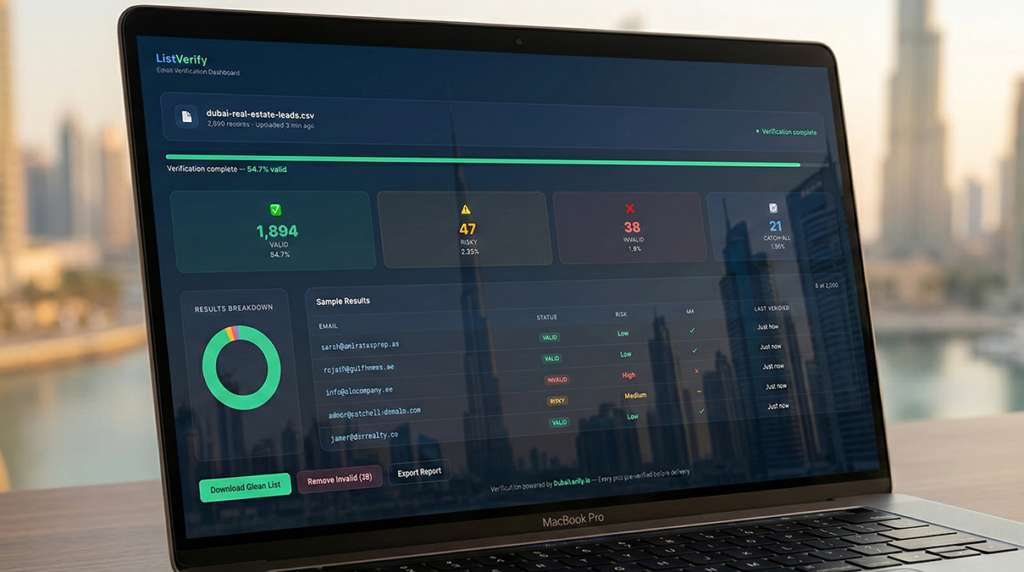
The mailbox exists, the server confirmed it, and there are no red flags. Send to these addresses with confidence. A well-verified list should have 70-85% of addresses in this category.
2. Invalid (do not send)
The mailbox doesn’t exist, the domain has no MX records, or the server explicitly rejected the address. Remove these immediately. Sending to invalid addresses is the fastest way to kill your sender reputation. Even one campaign with a high invalid rate can trigger spam filters that take weeks to resolve.
3. Risky (send with caution)
The address might be valid, but there’s a reason for concern — it could be a role-based address (info@, admin@), the mailbox might be full, or the server gave an ambiguous response. You can send to these, but keep them in a separate segment and monitor bounce rates closely. Ultimately, stop sending to this segment if bounces exceed 3%.
4. Catch-all (needs manual judgment)
The domain accepts all email regardless of the specific mailbox. Verification can’t confirm whether the individual address is real. Your decision here depends on volume and risk tolerance.
If catch-all addresses are 10% or less of your list, you can include them. If they’re 30%+ (which happens with Dubai lists), you need to be more selective. One approach: only include catch-all addresses where you have additional confidence signals — the person is on LinkedIn, the company website lists them, or you found the address from a reliable source.
5. Unknown (verification couldn’t determine status)
The verification service couldn’t connect to the mail server, the server timed out, or rate limiting prevented the check. Re-verify these after 24-48 hours. If they come back “unknown” again, treat them as risky. Many verification services have retry mechanisms built in, but server-level issues can persist.
The golden rule: Only send to Valid addresses when you’re warming up a new domain. Once your domain has established reputation (4+ weeks of warmup), you can carefully mix in Risky and Catch-all addresses at 10-15% of your total send volume.
Step-by-Step: How to Verify a List Using NeverBounce, ZeroBounce, or Hunter.io
All three of these tools follow a similar process. Here’s the step-by-step workflow with tool-specific notes.
Step 1: Prepare your file
Export your lead list as a CSV. At minimum, you need a column with email addresses. Including first name, last name, and company helps you cross-reference results later. Remove duplicate email addresses before uploading — most tools charge per address, and duplicates are wasted credits.
Step 2: Upload to your verification tool
- NeverBounce: Supports CSV, XLS, and direct paste. Drag-and-drop upload. Map your email column during upload. Pricing starts at $0.008/email for pay-as-you-go and drops to $0.003/email at volume.
- ZeroBounce: CSV upload or API integration. Includes additional data enrichment (gender, location, registration date) at no extra cost. Pricing starts at $0.0075/email.
- Hunter.io: CSV upload through their “Bulk Email Verifier” feature. More limited than NeverBounce or ZeroBounce but integrated with their email finder. 1,000 free verifications per month on the Starter plan.
Step 3: Run verification
Processing time depends on list size:
- 1,000 addresses: 2-5 minutes
- 10,000 addresses: 15-30 minutes
- 100,000 addresses: 2-6 hours
In reality, most tools send you an email notification when the job is complete.
Step 4: Download and segment results
Download the results CSV. Notably, it will include the original data plus a verification status column. Create separate segments:
- Valid addresses → Primary send list
- Catch-all addresses → Secondary list (with caution)
- Risky addresses → Tertiary list (test in small batches)
- Invalid addresses → Delete permanently
- Unknown addresses → Re-verify in 48 hours
Step 5: Import clean data into your CRM or outreach tool
Upload only your Valid (and optionally Catch-all) segments into your cold email tool. Tag the source and verification date so you know when re-verification is needed. For detailed import instructions, check our CRM lead import guide.
Tool recommendation
For Dubai-focused B2B lists, we recommend ZeroBounce as the primary tool. Their catch-all detection is the most accurate of the three, and catch-all domains are disproportionately common in the UAE market. Importantly, use NeverBounce as a secondary cross-check for high-value lists where you want extra confidence.
How Often to Re-Verify Your Lists: The Data Decay Rate Problem
Specifically, your verified list starts decaying the moment you download it. Additionally, the question isn’t whether your list will degrade — it’s how fast and what to do about it.
Data decay rates by timeframe
- 30 days: 2-3% of addresses become invalid (job changes, company closures)
- 90 days: 6-10% become invalid
- 6 months: 12-18% become invalid
- 12 months: 22-30% become invalid
In Dubai specifically, the decay rate skews toward the higher end. The UAE’s transient workforce means higher job turnover than mature markets. Employees on two-year visa cycles frequently leave, and entire companies dissolve when free zone licenses aren’t renewed.
Re-verification schedule
Based on these decay rates, here’s the practical schedule:
- Active campaign lists (sending now): Re-verify every 30 days
- Warm lists (sent to in past 90 days, not currently active): Re-verify before your next campaign
- Cold lists (haven’t sent in 90+ days): Full re-verification required before any sending
- Purchased lists (new acquisition): Always verify before first send, regardless of what the provider claims
The cost of not re-verifying
Let’s do the math. Therefore, you have a list of 5,000 addresses that was 95% valid three months ago. At a 10% decay rate, 500 addresses are now invalid. If you send a campaign without re-verifying:
- 500 hard bounces (10% bounce rate — well above the danger zone)
- Your domain gets flagged by Gmail and Microsoft 365
- Subsequent sends land in spam for your entire list
- You lose 2-4 weeks of sending capacity while reputation recovers
- The total cost: not just the $15-$40 for re-verification, but thousands in lost pipeline
Re-verification is cheap insurance. At $0.003-$0.008 per email, cleaning a 5,000-address list costs $15-$40. That’s a fraction of what you’ll lose from a reputation hit.
The “Clean Before Send” Workflow
Here’s the complete workflow we recommend for every cold email campaign targeting Dubai businesses. Tape this to your monitor.
Pre-campaign (1-2 weeks before launch)
- Export your target list from your CRM or data source
- De-duplicate — remove any email address that appears more than once
- Remove role-based addresses — info@, sales@, admin@, support@ unless you’re deliberately targeting those
- Run verification through ZeroBounce or NeverBounce
- Segment results into Valid, Catch-all, Risky, Invalid
- Delete Invalid from your CRM permanently — they’ll never come back to life
- Import Valid addresses into your cold email tool
- Optionally import Catch-all addresses as a separate campaign with lower daily volume
During campaign
- Monitor bounce rate daily. If it exceeds 3% on any day, pause the campaign immediately
- Remove bounced addresses in real-time — most tools do this automatically, but verify
- Track complaint rates. If spam complaints exceed 0.1%, review your messaging and targeting
Post-campaign
- Export bounce list from your sending tool
- Permanently remove bounced addresses from your master database
- Update CRM with engagement data (opened, clicked, replied, bounced)
- Flag unengaged addresses (no opens in 3+ sends) for re-verification before next campaign
This email list cleaning workflow adds 30-60 minutes of prep time to each campaign. Notably, it saves you days of downtime from deliverability issues. The math is obvious. For more on protecting your sender reputation through this process, see our email deliverability guide.
Why Pre-Verified Leads Save Time and Money: The DubaiLeads.io Difference
Everything described above — the verification process, the segmentation, the re-verification cycles — takes time and money. Even with efficient tools, you’re spending $50-$200 per month on verification services and 2-4 hours per campaign on cleaning workflows.
That’s the cost of working with unverified data. The alternative is to start with data that’s already been through this process.
What pre-verification means at DubaiLeads.io
Indeed, every lead list available on DubaiLeads.io goes through a multi-stage verification pipeline before it reaches you:
- Initial sourcing: Contacts are compiled from trade license registries, free zone directories, company websites, and professional networks — not scraped from Google Maps
- Email verification: Every address runs through SMTP-level verification (the same process described in this article) using multiple verification providers for cross-validation
- Decision-maker confirmation: Job titles and roles are validated against LinkedIn profiles and company websites
- Catch-all handling: Catch-all addresses are flagged and only included when secondary evidence confirms the contact’s validity
- Continuous re-verification: Lists are re-verified on a rolling cycle so data doesn’t decay between purchase and use
The time savings
When you download a DubaiLeads.io list, you can import directly into your cold email tool and start sending. No cleaning step. No verification cost. No 24-hour wait for results. The list is campaign-ready on download.
For a team running 2-3 campaigns per month, that’s 6-12 hours saved on data cleaning alone — plus $100-$400 in verification tool costs eliminated.
The deliverability advantage
DubaiLeads.io lists maintain a bounce rate under 3% (compared to 15-40% from scraped or unverified sources). Starting your campaign with clean data means your sending reputation stays healthy from day one — no recovery periods, no spam folder purgatory, no wasted warm-up time on domains that get burned by bad data.
Red Flags When Evaluating a Lead Provider’s Data Quality
Importantly, not all lead databases are equal. If you’re evaluating any lead provider for Dubai B2B data (including us — hold us to these standards too), here are the red flags to watch for:
Red flag 1: No mention of verification methodology
If a provider can’t explain how they verify their data, they probably don’t. Ask: “What’s your verification process?” If the answer is vague or they change the subject, walk away.
Red flag 2: Suspiciously large databases
“500,000 UAE business contacts” sounds impressive until you realize there are approximately 350,000 total active trade licenses in the UAE. If a database claims more contacts than there are businesses, the data includes duplicates, dead companies, or fabricated entries.
Red flag 3: No bounce rate guarantee
Credible lead providers stand behind their data with a bounce rate guarantee — typically under 5%. If a provider won’t guarantee deliverability, your risk is uncapped.
Red flag 4: “100% accuracy” claims
In fact, no database is 100% accurate. Data decays constantly. Any provider claiming perfect accuracy is either lying or doesn’t understand their own data. Specifically, look for providers who are transparent about their accuracy rates and update frequencies.
Red flag 5: No sample or trial available
Reputable providers let you test the data before buying a full list. If you can’t get a sample of 50-100 contacts to verify independently before committing, that’s a warning sign.
Red flag 6: Pricing that seems too cheap
Verified, accurate B2B data costs money to compile and maintain. If a provider is offering 10,000 “verified” UAE contacts for $50, the data is either scraped without verification, years old, or both. Quality data reflects the cost of quality processes.
Red flag 7: No industry or segment granularity
If a provider only sells by geography (“UAE contacts”) without industry segmentation, company size filters, or decision-maker title options, they’re selling a bulk dump, not a curated database. Useful lead data needs to match your specific ICP, not just your target country.
Red flag 8: No clear update or re-verification schedule
Ask: “How often is this data re-verified?” If the answer is “once, at the time of compilation” or if they can’t give you a specific schedule, expect high decay and outdated contacts. Quality providers re-verify at least quarterly, and the best do it monthly or continuously.
The lead data you use is the foundation of everything else — your deliverability, your response rates, your pipeline, and ultimately your revenue. Invest 30 minutes in evaluating your provider before you invest thousands in campaigns built on their data. It’s the highest-leverage 30 minutes you’ll spend.
This article is part of our comprehensive B2B Lead Generation in Dubai: The 2026 Playbook — the complete guide to generating pipeline in the UAE market.